Drop .APK and .OBB Files Here
Select one or more .apk splits and optional .obb expansion files
Supports multiple files • Auto-generates XAPK v2 manifest.jsonWhy Package APK + OBB into an XAPK Container?
When distributing large Android builds, QA test releases, or personal backups that include separate main.<ver>.<pkg>.obb asset archives or modular ABI splits, sending multiple loose files causes users to misplace the OBB folder. Packaging them into a single .xapk bundle solves this cleanly.
- Automatic OBB Path Routing: Places every .obb file inside Android/obb/<package_name>/ and writes the exact install_location: "EXTERNAL_STORAGE" rule into manifest.json.
- Automatic Split ID Assignment: Assigns base and config.* split identifiers so open-source installers and our XAPK to APK Merger recognize every module.
- Auto-Detects Package Name from OBB Filename: If you drop main.104.com.company.title.obb, the builder automatically extracts com.company.title and version code 104.
XAPK Specification v2 Reference & APK to XAPK / APKS Conversion Guide
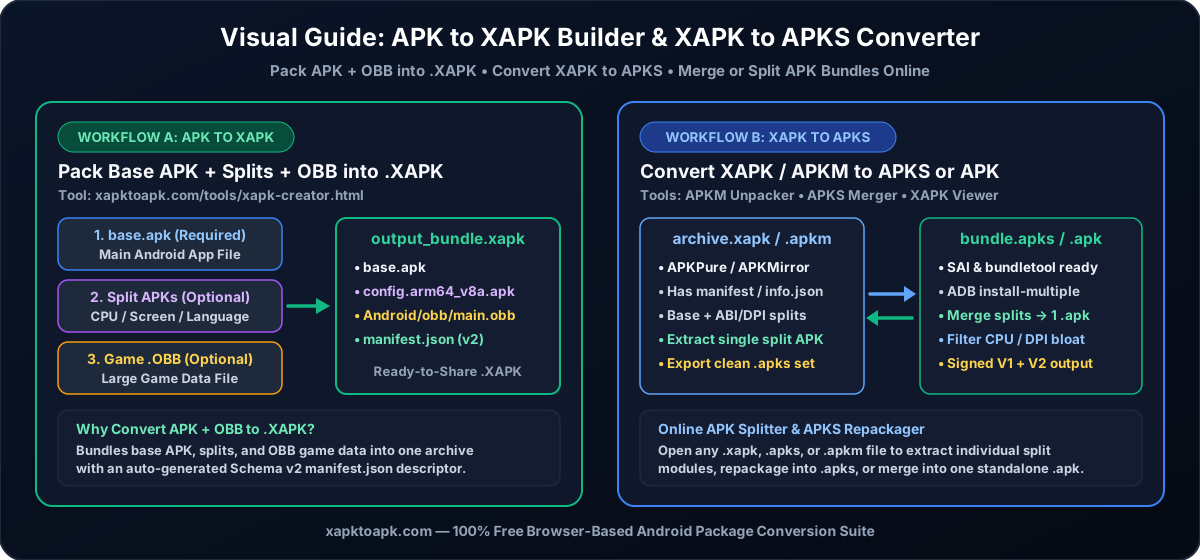
The XAPK container specification uses standard DEFLATE ZIP framing with a mandatory root-level manifest.json file encoded in UTF-8 without BOM. To guarantee compatibility across desktop unpackers, ADB deployment scripts, and split-APK installers, an XAPK bundle must follow these structural conventions:
- Root-Level Split APKs (split_apks): Every .apk file inside the bundle is stored at the root of the ZIP archive. The primary module must carry "id": "base", while architecture, density, and locale modules carry "id": "config.<qualifier>" (for example, config.arm64_v8a or config.xxhdpi).
- Expansion Asset Hierarchy (expansions): Each .obb expansion blob is stored inside Android/obb/<package_name>/<filename>.obb within the ZIP tree and declared in the expansions array with "install_location": "EXTERNAL_STORAGE" and "install_path": "Android/obb/<package_name>/<filename>.obb".
- Byte-Accurate total_size Calculation: Installers verify that the total_size integer in manifest.json equals the exact sum of the uncompressed byte lengths of all packaged .apk and .obb files so devices can pre-check available flash storage before extraction. Our builder computes this exact byte sum automatically.